
CRM AI calling from Your CRM - Dial, Transcribe, Update, Repeat
Crm Ai Calling is what makes this solution stand out for Indian businesses. Your sales reps spend 40% of their post-call time writing notes. That is 2-3 hours per day of admin work that does not close deals. LeadSense AI calling eliminates it completely. Click a contact, make the call, and by the time you hang up, the transcription is logged, the sentiment is scored, the deal record is updated, and the next action is suggested. Your reps focus on the conversation. The AI handles everything else.
Crm Ai Calling: The Hidden Cost of Manual Call Logging
Calculate what manual call logging is costing your team right now. If a rep makes 30 calls per day and spends 4 minutes after each call updating the CRM - a very conservative estimate - that is 2 hours of every workday spent on data entry instead of selling. For a team of 10 reps, that is 20 hours per day of lost selling time. At a conservative revenue-per-hour of ₹5,000, that is ₹1,00,000 per day, ₹22,00,000 per month in opportunity cost from note-taking alone.
And manual notes are not even accurate. Research consistently shows that humans recall only 40% of a conversation accurately 20 minutes after it ends. Key objections get paraphrased, important commitments get forgotten, and pricing discussions that happened at minute 8 of a 12-minute call often do not make it into the CRM at all - because the rep was thinking about their next call.
AI transcription captures everything. Verbatim. Indexed and searchable. Available to the rep, their manager, and the onboarding team the moment the call ends.
Crm Ai Calling: What Happens When You Click Call in LeadSense
One-Click Dial
Click the phone icon on any contact record or deal card. LeadSense dials via VoIP using your registered business number. The call appears in your browser - no headset configuration, no separate dialler software. Works on Chrome and Edge.
Live Transcription
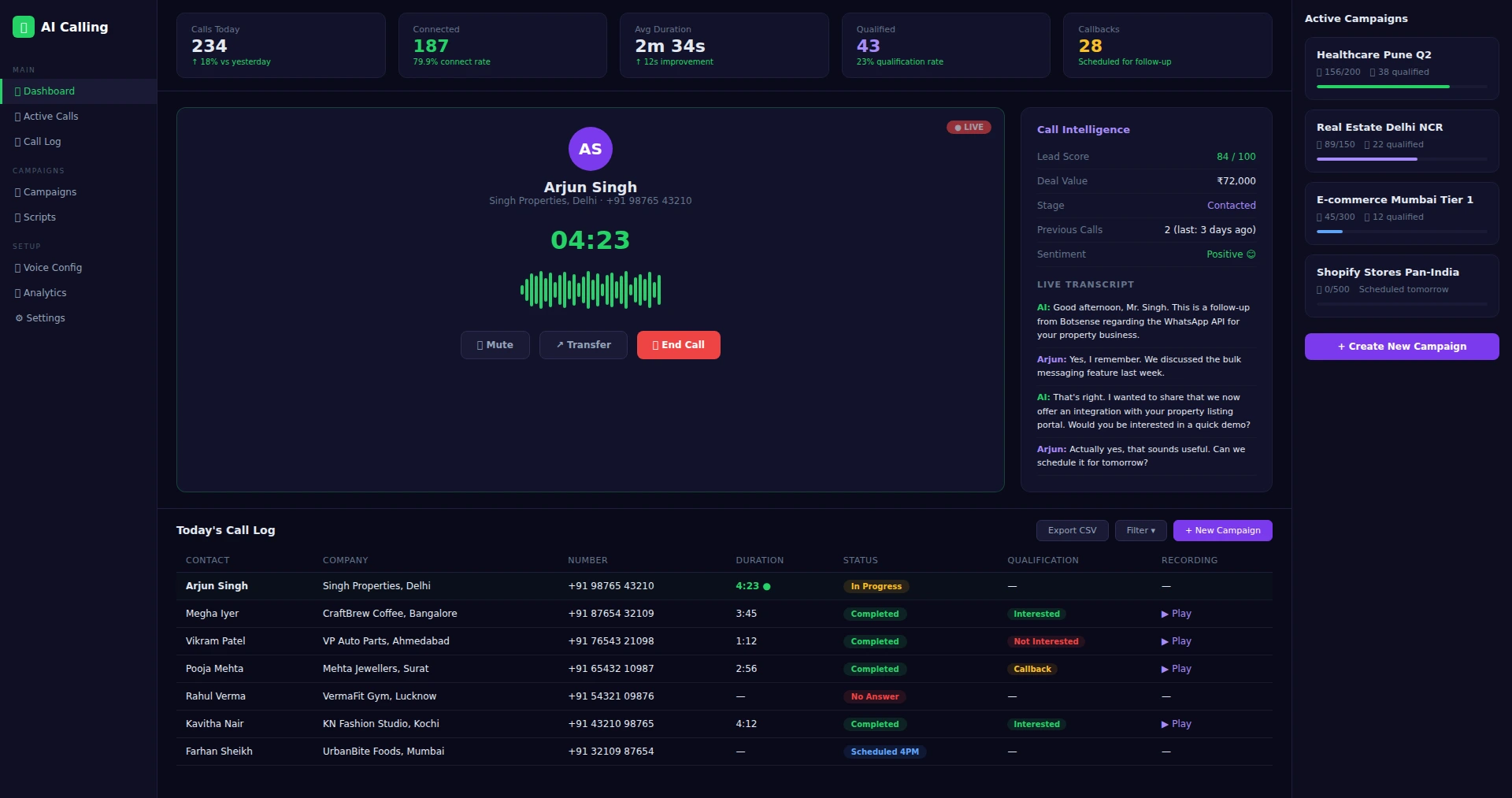
As the conversation happens, LeadSense transcribes it in real time - displayed in a sidebar during the call. Supports Hindi, English, Tamil, Telugu, Kannada, and Marathi. Speaker diarisation separates your rep's voice from the prospect's automatically.
Sentiment and Intent Analysis
At call end, AI analyses the transcript for sentiment (positive/neutral/negative), key topics discussed, objections raised, and next steps mentioned. A call summary is generated in 3-5 sentences - accurate enough that most reps paste it directly into their pipeline update.
Automatic CRM Update
The call record - timestamp, duration, transcript, summary, sentiment score - is attached to the contact and deal timeline automatically. The AI lead score is updated to reflect the call outcome. If next steps were mentioned, a follow-up task is suggested with a due date pre-filled.
For Sales Managers: AI Calling Analytics
LeadSense AI Calling gives sales managers something they have never had before - objective, consistent data on every call, not just the ones a rep decides to log properly. From the manager dashboard:
Call Volume by Rep
Total calls, connected calls, and call duration per rep per day/week/month. Identify who is making the calls and who needs coaching on activity.
Sentiment Trends
Average sentiment score per rep. If one rep's calls consistently score negative, listen to a sample of transcripts to understand whether it is a talk track issue or a lead quality issue.
Objection Pattern Analysis
LeadSense tags objection phrases across all calls - "too expensive", "already using X", "not the right time" - and surfaces the most common ones in a weekly manager report. Use this to update your sales playbook.
Talk-to-Listen Ratio
Top performers in consultative selling listen more than they talk. LeadSense's speaker diarisation calculates the rep's talk-to-listen ratio per call and aggregates it into a weekly average.
For advanced AI Calling infrastructure - outbound dialler campaigns, IVR, voice bots - see the dedicated AI Calling Software India page and AI Calling Pricing.
AI Calling + WhatsApp - The Combination That Closes More Deals
The highest conversion sequences in Indian sales combine a call with an immediate WhatsApp follow-up. LeadSense automates this entire loop. Your rep finishes a call where the prospect said "send me the brochure". LeadSense detects the phrase "send me the brochure" in the transcript, creates a follow-up task, and - if you have configured the automation - sends the brochure PDF via WhatsApp within 60 seconds of the call ending.
No rep action required. The prospect receives the document while the conversation is fresh. Reply rates to post-call WhatsApp messages are 3× higher than to messages sent the next day. LeadSense automates the timing that converts.
How AI Calling Works Inside LeadSense
LeadSense's AI Calling is not a separate tool - it is embedded directly into your sales pipeline. From any lead card, your team can trigger an AI-powered call that qualifies the prospect, answers their questions, schedules appointments, and updates the CRM automatically. Here is the step-by-step flow:
Select Leads and Define the Calling Script
Choose leads from your pipeline - either individually or in bulk (filter by stage, score, city, or source). Define or select a calling script. Scripts are customisable conversation flows that tell the AI agent what to say, what questions to ask, and how to handle different responses. For example, a real estate script might ask about budget range, preferred location, timeline, and family size. A SaaS script might ask about current tools, team size, and pain points. Scripts support both English and Hindi.
AI Agent Makes the Call
The AI voice agent dials each lead using a natural-sounding voice. It introduces itself, explains why it is calling (on behalf of your business), and begins the qualification conversation. The agent handles interruptions, off-topic responses, and common objections gracefully. Average call duration is 2-4 minutes for qualification calls. The AI agent can handle up to 50 concurrent calls during a campaign, reaching your entire lead list in hours instead of days.
Real-Time Transcription and Analysis
Every call is transcribed in real time. The system analyses the conversation for buying signals (mentions of budget, timeline, interest), objections (price concerns, competitor mentions, timing issues), and sentiment (positive, neutral, negative). The call summary - key points, qualification result, and recommended next action - appears on the lead card within seconds of the call ending. Your sales team reads a 3-line summary instead of listening to a 4-minute recording.
CRM Pipeline Updated Automatically
Based on the call outcome, LeadSense updates the lead's pipeline stage. An "Interested" result moves the lead to Qualified. A "Callback Requested" result schedules a follow-up call and moves to Contacted. A "Not Interested" result marks the lead accordingly but keeps it in the database for future campaigns. The salesperson's pipeline view reflects these changes in real time - they know which leads are warm and ready for a personal follow-up call.
AI Calling Use Cases for Indian Businesses
Insurance: Bulk Renewal Reminders
An insurance agent managing 2,000 policyholders needs to make renewal calls every month. Manually calling 200 people costs 3-4 days of a telecaller's time. LeadSense's AI agent handles all 200 calls in a single afternoon. The script checks if the policyholder wants to renew, confirms the premium amount, and offers to connect them to the agent if they have questions. Interested policyholders are flagged in the pipeline with their preferred contact time. The agent only speaks to warm prospects - saving 80% of their phone time.
Education: Admission Enquiry Follow-ups
During admission season, coaching institutes receive hundreds of enquiries through website forms, just missed calls, and walk-ins. Many of these leads go cold because counsellors cannot follow up fast enough. LeadSense AI Calling contacts every new enquiry within 1 hour of submission. The AI agent confirms interest, asks about the student's grade and target exam, and schedules a counselling session. Institutes using this approach report 45% higher counselling conversion rates compared to manual follow-up within 24-48 hours.
E-commerce: Abandoned Cart Recovery Calls
For high-value products (₹5,000+), a phone call converts better than a WhatsApp message. A premium furniture brand in Bangalore uses LeadSense to trigger AI calls for carts abandoned above ₹10,000. The AI agent mentions the specific product, offers free delivery or a small discount, and can transfer the call to a human sales agent if the customer is ready to order. This call-based recovery converts at 12% - significantly higher than WhatsApp recovery alone.
B2B: Cold Lead Qualification at Scale
B2B sales teams often inherit lead lists of 5,000+ contacts from trade shows, industry directories, or purchased databases. Manually calling each one is impractical. LeadSense AI Calling filters through the entire list in days, qualifying leads based on company size, budget, and buying timeline. A technology services company in Pune reduced their BDR team's cold calling time by 70% - the AI agent handled the first touch, and human BDRs only spoke to pre-qualified prospects with confirmed interest and budget.
Why AI Calling is a Major Advantage for Indian Sales
India's B2B and B2C sales culture still revolves around phone calls. Unlike Western markets where email and LinkedIn dominate outreach, Indian buyers expect and prefer phone conversations for high-value purchases. But manual calling has severe limitations that AI calling solves:
- Speed to Lead: Industry data shows that contacting a lead within 5 minutes of enquiry increases conversion by 400%. Most Indian sales teams respond within 4-24 hours due to workload. AI calling can reach every new lead within minutes of entering the pipeline - before the prospect has time to contact your competitor.
- Consistent Quality: Human telecallers have good days and bad days. They skip leads they find intimidating, rush calls when tired, and forget to ask qualifying questions. AI agents follow the script consistently on every call - the 500th call is as professional as the first.
- Hindi and Hinglish Support: LeadSense AI agents speak natural Hindi and Hinglish, not robotic text-to-speech. This is critical for reaching prospects in tier-2 and tier-3 cities where English fluency varies. A prospect in Lucknow hears a natural Hindi greeting, not a translated English script.
- Cost Efficiency: A full-time telecaller in India costs ₹15,000-₹25,000/month in salary plus infrastructure. They make 80-100 calls per day with 30-40% connect rate. LeadSense AI calling at ₹1.5/minute costs ₹4.50 per 3-minute call - ₹450 for 100 calls. That is 95% cheaper than a human telecaller for the initial qualification step.
- No Attrition Risk: Telecalling teams in India have 40-60% annual attrition. Training a new telecaller takes 2-4 weeks. AI agents never quit, never need retraining, and scale instantly from 10 to 10,000 calls per day.
AI calling does not replace your human sales team - it amplifies them. The AI handles the high-volume, repetitive first touch. Your salespeople handle the high-value conversations that require empathy, negotiation, and relationship building. It is the division of labour that makes your entire sales operation dramatically more efficient.
AI Calling FAQ
Give Your Team Back 2 Hours Every Day
AI calling is active in your Growth trial from day one. No configuration. Dial your first call from LeadSense and see the transcript appear in under 30 seconds.