
AI Lead Scoring — Know Exactly Which Leads Are Ready to Buy
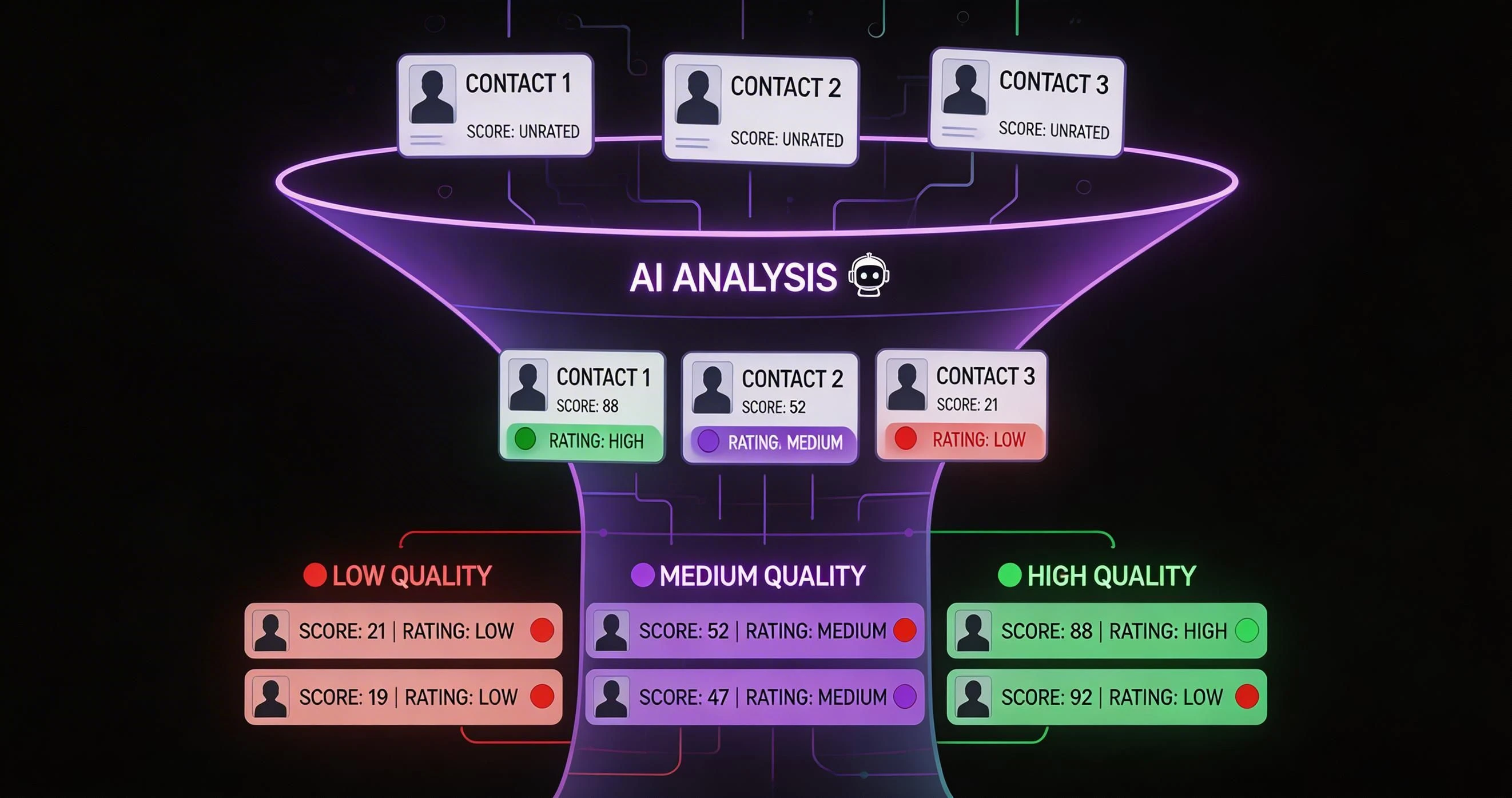
Your sales team is spending 60% of their time on contacts who will never convert. LeadSense AI lead scoring fixes that by watching every signal — WhatsApp reply times, call pickup rates, pricing page visits, form fills — and giving each contact a live score from 0 to 100. Your reps call the 90-scorers first. Response times drop. Conversions go up. It is not magic; it is just better prioritisation.
The Problem with Manual Lead Prioritisation
Ask any sales manager in India how their team decides who to call next and you will hear one of three answers: they call whoever submitted a form most recently, they call whoever their gut tells them is hot, or they call whoever the manager told them to chase last week. None of these approaches scale, and all three leave revenue on the table.
Research across Indian B2C sales teams shows that the probability of converting a lead drops by over 80% if first contact happens after 5 minutes of submission. Yet the average Indian sales team takes 47 minutes to make first contact. That is not a motivation problem — it is a prioritisation problem. When every lead looks equal in a flat CRM list, reps do not know where to start.
Manual scoring fields — that little "hot/warm/cold" dropdown — make this worse, not better. They require discipline from reps who are already multitasking, they are based on gut feeling rather than data, and they go stale within hours. A lead marked "warm" on Monday morning may have visited your pricing page four times by Monday afternoon — but unless your rep manually updates the record, the score stays wrong.
LeadSense replaces all of that with a system that watches every signal automatically and updates scores in real time, without any rep input.
How LeadSense AI Lead Scoring Works
LeadSense monitors signals across five categories — behavioural, demographic, engagement, channel, and temporal — and weights them using a model trained on conversion data from Indian sales teams. The result is a single score from 0 to 100 displayed prominently on every contact record and pipeline card.
Signal Collection
Every interaction with your lead is captured: WhatsApp message sent, WhatsApp reply received, AI call attempted, call picked up, call duration, email opened, email clicked, pricing page visited, demo form submitted, document downloaded. Each event is timestamped and stored against the contact record.
Signal Weighting
Not all signals are equal. A WhatsApp reply is a much stronger buying signal than a website page view. A call that lasted 4 minutes signals higher intent than a call that lasted 12 seconds. LeadSense's default weights are pre-calibrated for Indian market behaviour, and you can adjust them from the settings panel.
Real-Time Score Update
Within seconds of a new signal, the contact's score is recalculated. If a lead who was at 45 just replied to your WhatsApp message after three days of silence, their score might jump to 72. Your reps see this immediately in the pipeline view — colour-coded cards make hot leads impossible to miss.
Automated Actions on Score Thresholds
Set triggers based on score: when a contact crosses 80, automatically assign to your senior closer, send a personalised WhatsApp template, and create a follow-up task. When a score drops below 30 after 14 days of silence, move to a nurture sequence automatically. No manual work required.
The 40+ Signals LeadSense Tracks
Here are the signal categories and examples of individual signals within each group:
WhatsApp Signals
- Message sent (outbound)
- Message delivered (double tick)
- Message read (blue tick)
- Reply received (strong positive)
- Reply time (faster = higher score)
- Template interaction (button click)
Calling Signals
- Call attempted
- Call connected vs missed
- Call duration
- Callback requested
- AI call sentiment score
- Call outcome tag (interested/not now)
Web Behavioural Signals
- Pricing page visits and frequency
- Demo page visit
- Feature page dwell time
- Form submission
- Document / brochure download
- Return visit within 72 hours
Email Engagement
- Email open
- Email click-through
- Multiple opens (same email)
- Sequence completion rate
- Reply to email
Demographic Fit
- Company size (enriched)
- Industry match
- Job title seniority
- City / geography
- Funding stage (for B2B)
Temporal Signals
- Days since last interaction
- Recency of inbound activity
- Stage time (how long in current stage)
- Score decay (auto-reduces stale leads)
AI Scoring vs Manual Scoring — A Detailed Comparison
| Factor | Manual Scoring | LeadSense AI Scoring |
|---|---|---|
| Update frequency | When rep remembers | Real-time, automatic |
| Objectivity | Gut feeling / bias | Data-driven |
| Rep time required | 3-5 min per lead | Zero |
| WhatsApp signals included | Only if logged manually | Automatic |
| Scales with team growth | Degrades | Improves |
| Score decay for stale leads | Never (manual effort) | Automatic |
| Automation triggers | Not possible | Yes — on any threshold |
Real Results from Indian Teams Using AI Lead Scoring
A real estate developer in Gurgaon generating 400 leads per month from digital campaigns was struggling with a 2.1% lead-to-site-visit conversion rate. After deploying LeadSense AI scoring and configuring their reps to prioritise 75+ scored leads first, first-contact time dropped from 52 minutes to 6 minutes and site visit conversion reached 4.8% within 60 days — a 128% improvement without adding headcount.
An insurance brokerage in Mumbai with 14 agents was spending 3+ hours per day on administrative lead sorting. The manager would assign leads manually each morning based on source. With AI scoring running continuously, agents now open their LeadSense queue every morning to a colour-coded list sorted by score. Lead assignment time went from 3 hours to 0 — the manager uses that time for coaching instead.
An edtech company in Bengaluru running multiple simultaneous courses had the added complexity of scoring leads by course-specific intent. LeadSense's custom scoring weights let them set up separate scoring profiles per product line, so a parent enquiring about school admissions and a professional enquiring about a data science course are scored against different conversion benchmarks.
How LeadSense Lead Scoring Works: Step by Step
LeadSense's scoring engine evaluates every lead the moment it enters your pipeline. The process is fully automatic — no manual tagging or grading required. Here is what happens behind the scenes:
Data Collection
When a lead enters LeadSense — whether from a form submission, WhatsApp message, CSV import, or AI Discovery — the system immediately collects all available data points. This includes the lead's email domain, phone number format, website URL, social media links, and any custom fields your team has configured. For Shopify store owners, it also pulls product count, store age, theme, and active plugins. This raw data forms the foundation of the scoring model.
Enrichment and Verification
The enrichment engine verifies and expands the collected data. Email addresses are validated (is it a real inbox?). Phone numbers are checked for WhatsApp Business registration. Website domains are analysed for traffic rank, technology stack, and business category. Company information — founding year, employee count, industry — is pulled from public databases. This enrichment typically adds 15-25 data points that were not present in the original lead record.
Signal Weighting
LeadSense evaluates 40+ signals across four categories: Business Quality (website traffic, product count, store maturity), Contact Quality (verified email, WhatsApp Business account, complete contact info), Engagement (response time, message opens, link clicks), and Buying Intent (pricing page visits, demo requests, feature questions). Each signal has a configurable weight. For example, a WhatsApp Business API account presence adds 12 points because it indicates the lead is already invested in business messaging — making them a warmer prospect for your product.
Score Assignment and Classification
The weighted signals produce a final score from 0 to 100. LeadSense classifies leads into three tiers: Qualified (70-100) are high-priority leads ready for direct sales outreach; Review (40-69) are promising leads that need nurturing or additional qualification; Junk (0-39) are low-quality leads that should not consume sales team time. Your team can customise these thresholds. An agency selling premium services might set Qualified at 80+, while a high-volume e-commerce business might use 60+.
Lead Scoring for Indian Industries
Scoring Shopify and E-commerce Leads
For businesses targeting e-commerce store owners, LeadSense's scoring model analyses Shopify-specific signals that generic CRMs cannot detect. Product count indicates store seriousness (stores with 100+ products score higher). Active payment gateways like Razorpay or Cashfree suggest real transaction volume. Instagram and Facebook shop connections indicate marketing maturity. A Shopify store in Surat selling sarees with 300 products, Razorpay integration, and an active Instagram account with 10K followers might score 79 — a clear "Qualified" lead worth prioritising. A single-product store on a free theme with no social presence might score 22 — tagged as "Junk" to save your team's time.
Scoring Real Estate Enquiries
Real estate leads behave differently from e-commerce leads. LeadSense adjusts scoring weights for property businesses: budget range carries heavy weight (a prospect looking at ₹80 lakh+ properties scores higher for premium developers), location preference matching (does the lead's preferred area match your project location?), enquiry source quality (a Homiful.com premium listing lead scores higher than a generic web form), and response speed (leads who respond within 10 minutes of receiving your WhatsApp message show genuine intent). Real estate teams using LeadSense's scoring report 40% faster qualification — they stop chasing time-wasters and focus on serious buyers.
Scoring B2B Service Leads
For B2B businesses like IT services, consulting firms, and marketing agencies, LeadSense scores based on company size indicators (employee count, website traffic), technology sophistication (what tools do they already use?), and decision-maker identification (is the contact a founder, CTO, or marketing manager vs. an intern?). A SaaS company in Bangalore targeting mid-market businesses can configure scoring to heavily weight company revenue indicators and LinkedIn profile seniority, ensuring their BDR team only calls decision-makers with budget authority.
Why Manual Lead Scoring Fails for Growing Teams
Many Indian businesses still score leads manually — a salesperson looks at a lead, makes a gut judgment, and decides whether to follow up. This approach breaks down as volume grows:
- Inconsistency: Different salespeople grade the same lead differently. Your top performer's "hot lead" might be another person's "cold lead." There is no standardised framework, which means pipeline reports are unreliable.
- Speed: Manual scoring takes 2-5 minutes per lead. At 50 new leads per day, that is 2-4 hours spent just categorising leads instead of selling. LeadSense scores every lead in under 3 seconds.
- Bias: Salespeople unconsciously favour leads from familiar industries or cities. A clothing store from Mumbai gets prioritised over an equally good furniture store from Coimbatore simply because the salesperson knows the clothing market better. AI scoring eliminates this bias.
- Missing Data: A salesperson cannot check whether a lead's website has 10,000 or 100,000 monthly visitors. They cannot verify if the phone number has WhatsApp Business. They cannot assess the lead's ad spending or social media following. LeadSense checks all of this automatically.
- No Learning: Manual scoring does not improve over time. AI scoring learns from your team's conversion patterns — if leads with WhatsApp Business accounts convert at 3x the rate of leads without, the algorithm increases the weight of that signal automatically.
The transition from manual to AI scoring is the single highest-ROI change most Indian sales teams can make. It costs nothing extra (scoring is included in every LeadSense plan) and typically increases conversion rates by 25-40% within the first quarter.
Lead Scoring FAQ
Start Scoring Leads Intelligently Today
LeadSense AI scoring is live in your account from day one of the Growth trial. No setup, no configuration, no developer needed.