
Visual Pipeline Management — See Every Deal, Every Stage, Every Rupee
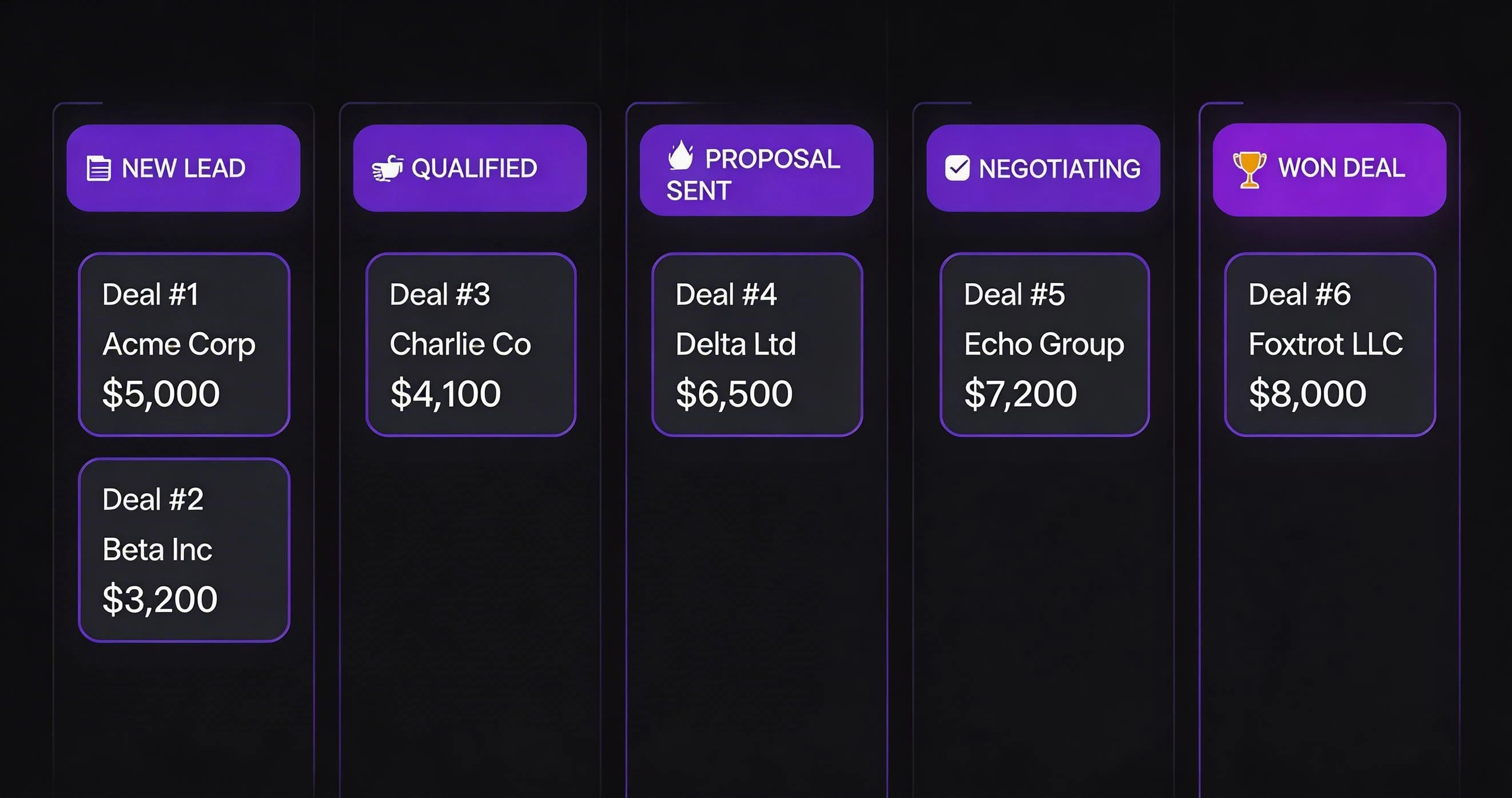
Sales Pipeline Management is what makes this solution stand out for Indian businesses. A spreadsheet is not a pipeline. A flat list of contacts in alphabetical order is not a pipeline. A real sales pipeline is a live view of where every deal sits, how long it has been sitting there, how much revenue it represents, and what action is needed right now to move it forward. LeadSense gives you that — in a Kanban board that your whole team can read in three seconds flat.
Sales Pipeline Management: What Makes a Great Sales Pipeline for Indian SMEs?
Most CRM vendors sell pipeline management as a static list with status fields. Sales managers in India — particularly those running B2C operations in real estate, education, insurance, or financial services — need something that moves faster than that. They need a board that updates as WhatsApp conversations happen, as AI calls land, as prospects go quiet. They need automation that kicks in the moment a deal stalls. And they need forecasting that actually means something — not just a sum of all open deal values, but a weighted view that accounts for stage-specific close probabilities. This is a key consideration when evaluating sales pipeline management for your business.
LeadSense pipeline management was built from scratch after interviewing 50+ Indian sales teams. The features you see below are not copies of what HubSpot or Salesforce built for the American market. They are solutions to the specific problems Indian teams told us they were solving with workarounds: Google Sheets, WhatsApp groups, sticky notes on a whiteboard, and twice-weekly pipeline review calls that ate three hours each time. This is a key consideration when evaluating sales pipeline management for your business.
Sales Pipeline Management: Core Pipeline Features
Drag-and-Drop Kanban Board
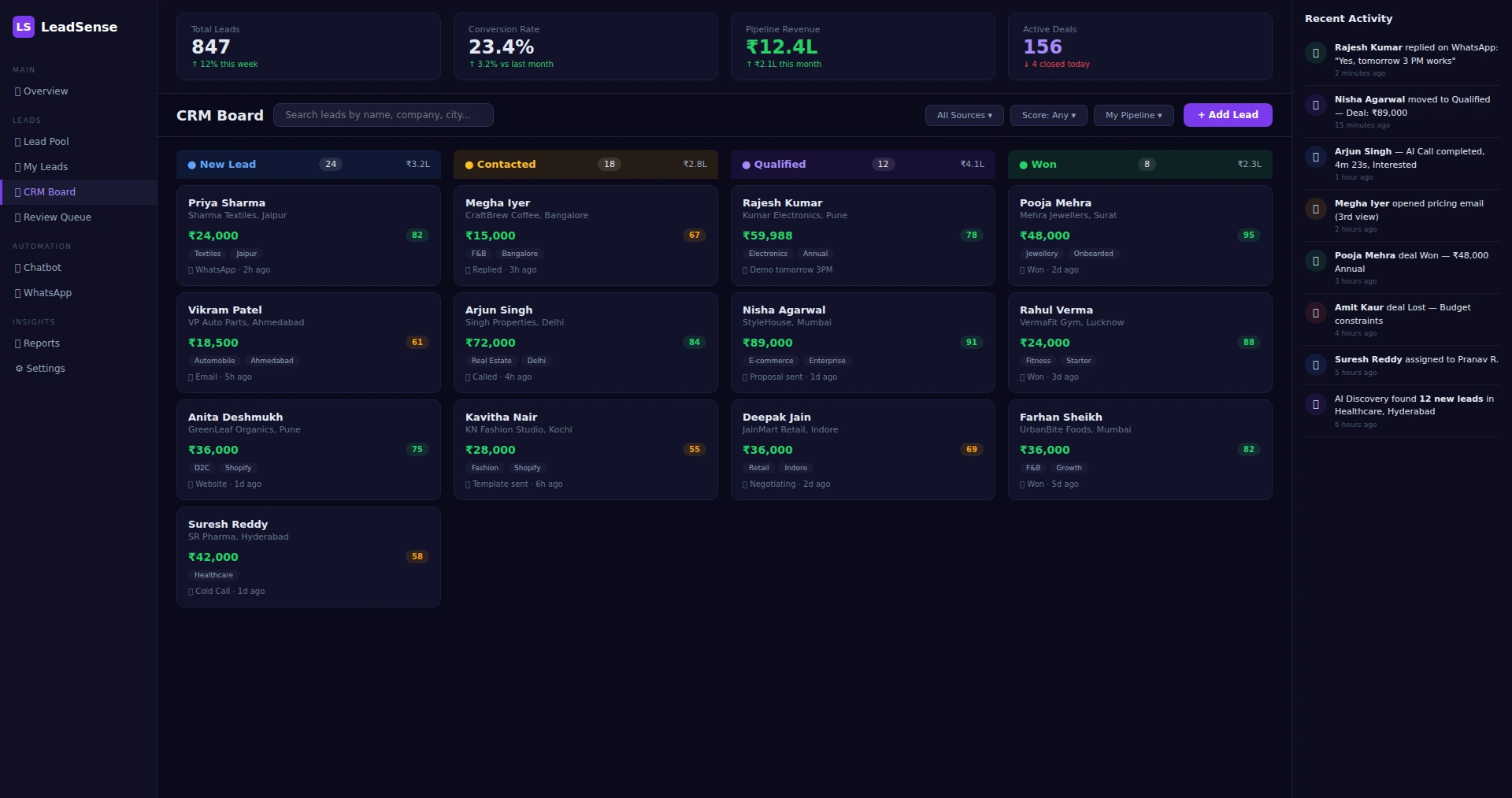
Drag deal cards between stages. Each card shows the deal value, contact name, AI lead score, days in current stage, and last activity type at a glance. No clicking into the record to understand context. This is a key consideration when evaluating sales pipeline management for your business.
Custom Deal Stages
Create as many stages as your sales process requires. A real estate developer might need: New Enquiry → Site Visit Scheduled → Site Visit Done → Proposal Sent → Negotiation → Booked. LeadSense supports all of this with custom names, colours, and close probability percentages per stage. This is a key consideration when evaluating sales pipeline management for your business.
Multiple Pipelines
Run separate pipelines for new business, upsell, renewals, and partner channel — all in one account. Each pipeline has independent stages, automation rules, and reporting. Growth and Enterprise plans have no pipeline limit. This is a key consideration when evaluating sales pipeline management for your business.
Stage-Based Automation
When a deal moves into a stage, trigger automatic actions: send a WhatsApp template, create a follow-up task, assign to a different rep, or update a custom field. Reduce the manual work between every stage transition.
Stall Detection
Configure maximum days-in-stage thresholds. LeadSense flags deals that have sat in one stage too long — highlighted in amber on the board, with an automatic manager alert after a configurable number of days. Never let a deal go cold unnoticed.
Weighted Revenue Forecasting
Each stage has a configurable close probability (e.g., Proposal Sent = 40%, Negotiation = 70%, Verbal Commit = 90%). Your pipeline value report multiplies each deal value by its stage probability to give a weighted forecast. Far more accurate than raw open pipeline value.
Pipeline Reporting for Sales Managers
LeadSense's pipeline reporting gives managers a set of views that answer the questions they actually ask in Monday morning reviews:
- Pipeline by rep: Total open deals, weighted value, and deals closing this month for each team member
- Stage conversion funnel: What percentage of deals progress from each stage to the next — identify where your pipeline leaks
- Average deal age by stage: Pinpoint which stage is the bottleneck in your process
- Won/lost analysis: Win rate by rep, by lead source, by deal size, by month
- Velocity report: Average days from New Enquiry to Closed Won over the last 30/60/90 days
- Revenue forecast calendar: Month-by-month weighted forecast view based on expected close dates
All reports export to CSV or PDF in one click. No BI tool required.
WhatsApp and Pipeline — Better Together
In most CRMs, pipeline and communication live in separate worlds. You update the deal stage in the CRM, then switch to WhatsApp Web to send a follow-up message, then come back and log a note. Three tools, three tab switches, thirty seconds of friction — multiplied by every interaction across your whole team every day.
LeadSense eliminates that context switch entirely. The deal record in your pipeline has a live WhatsApp thread embedded in the right panel. You can read the entire conversation history, reply to the last message, or trigger a new template sequence without leaving the deal card. When your rep closes a conversation with "send the proposal", they can drag the deal card to "Proposal Sent", and LeadSense automatically sends the proposal confirmation template on WhatsApp — no extra steps.
For teams also using AI Calling, the deal card shows the call log, transcription summary, and call sentiment score alongside the WhatsApp thread. Your rep's next action — whether it is a WhatsApp follow-up or a callback — is right there, in context, every time they open a deal.
How the LeadSense Pipeline Works in Practice
A sales pipeline is only useful if your team actually uses it. LeadSense's pipeline was designed for Indian sales workflows — fast-moving, WhatsApp-heavy, and team-oriented. Here is how it works from a daily-use perspective:
Morning: Review Your Pipeline
Each salesperson logs in to see their personal pipeline — a Kanban board showing their deals across stages like Fresh, Contacted, Demo Scheduled, Proposal Sent, Negotiation, and Won. Cards show the lead name, company, deal value in ₹, lead score, and days in current stage. Deals stuck for more than 3 days are highlighted in amber. Deals stuck for more than 7 days turn red. This visual system makes it impossible to forget about a follow-up. The salesperson picks their top-priority leads — the ones with the highest scores that have been waiting the longest — and starts their day.
Throughout the Day: Engage and Update
Every interaction updates the pipeline automatically. Send a WhatsApp message? The conversation is logged. Complete an AI Call? The transcript and qualification result appear in the deal timeline. Schedule a demo? The deal moves to "Demo Scheduled" with the date noted. The salesperson rarely needs to manually update anything — the CRM captures their workflow. When a prospect replies "Let me think about it," the salesperson logs a follow-up reminder for 3 days later and moves on. LeadSense will ping them when it is time.
End of Day: Team Visibility
The team lead opens the Agency Monitor and sees the full picture: total pipeline value across all team members, how many deals moved forward today, which team members have the most active deals, and which deals are at risk. They can drag deals between pipelines to redistribute workload. Weekly pipeline reviews take 15 minutes instead of an hour because all the data is already in one place — no asking "Hey, what happened with that Mumbai lead?"
Month End: Revenue Forecasting
LeadSense's pipeline analytics show weighted revenue forecasts based on deal values and stage probabilities. A deal worth ₹50,000 in the "Proposal Sent" stage (60% probability) contributes ₹30,000 to the weighted forecast. The total gives management a realistic picture of expected revenue for the month. Compare forecast vs. actual over time to improve accuracy.
Pipeline Management for Different Indian Business Types
Real Estate: Site Visit to Registration Pipeline
Property developers need a pipeline that tracks the unique real estate sales journey. LeadSense lets you create custom stages: Enquiry Received → Site Visit Scheduled → Site Visit Done → Negotiation → Booking Amount → Registration. Each stage can have automated actions — a WhatsApp template with project brochure goes out immediately at "Enquiry Received," while a personalised video walkthrough is sent after "Site Visit Done." Deal values in real estate are large (₹30 lakh to ₹2 crore), so pipeline accuracy directly impacts revenue forecasting for the business.
SaaS and Services: Demo to Contract Pipeline
Software companies and service providers follow a structured pipeline: Lead Qualified → Discovery Call → Demo → Proposal → Negotiation → Contract Signed → Onboarding. The LeadSense pipeline tracks monthly recurring revenue (MRR) alongside one-time deal values. For SaaS companies, the pipeline shows not just closed deals but ongoing customer health — which accounts are engaged on WhatsApp, which have gone silent, and which need a renewal conversation. Integration with the WhatsApp chatbot handles routine onboarding questions, freeing up account managers for higher-value conversations.
Education: Enquiry to Enrollment Pipeline
Coaching institutes and education companies deal with seasonal rushes — JEE season, MBA admission season, school admission season. During peak times, a single branch might handle 500+ enquiries per week. LeadSense's pipeline handles this volume with batch operations: select 50 leads, assign them to a counsellor team, and trigger a WhatsApp drip campaign — all in three clicks. The pipeline stages — Enquiry → Counselling → Fee Discussion → Enrolled → Batch Assigned — give the admissions team complete visibility into their conversion funnel. When the director asks "How many of last week's enquiries have converted?" the answer is one dashboard glance away.
E-commerce Services: Onboarding Pipeline
Agencies that help brands set up e-commerce stores manage multiple client projects simultaneously. Each deal in the pipeline represents a client project: Discovery → Proposal → Store Setup → Product Upload → Payment Gateway → Launch. The multi-tenant feature lets the agency owner see all projects across clients, while each client only sees their own progress. Deal values reflect the project fee, and the pipeline timeline shows how long each project phase typically takes — helping the agency estimate capacity and avoid overcommitting.
Why Indian Sales Teams Struggle Without Pipeline Visibility
Research consistently shows that sales teams with structured pipeline management outperform those without it by 28%. For Indian businesses, the problem is even more acute because of the communication complexity:
- WhatsApp conversations are invisible to management. A salesperson's personal WhatsApp is their primary sales tool, but the team lead has no visibility into those conversations. When the salesperson goes on leave, those deals go cold. LeadSense centralises all WhatsApp conversations within the pipeline, ensuring continuity.
- Deals are tracked in personal notebooks or WhatsApp chats. Indian salespeople commonly manage their pipeline in a paper diary or a WhatsApp group. This means no aggregate visibility, no forecasting, and no accountability. A sales manager managing 8 people has to individually ask each person for updates — a process that consumes hours every week.
- Follow-up discipline is inconsistent. Without automated reminders, follow-ups depend on individual discipline. Research shows that 80% of deals require 5+ follow-ups, but most salespeople give up after 2. LeadSense's automated follow-up reminders sent via WhatsApp ensure persistence without nagging.
- Revenue forecasting is guesswork. Without pipeline data, monthly revenue targets are based on hope rather than data. LeadSense's weighted pipeline forecasting gives management a realistic view of expected revenue, helping with cash flow planning, hiring decisions, and resource allocation.
Moving from informal tracking to a structured LeadSense pipeline typically takes less than a day. Import your existing leads, configure your stages, and your team is operational. The learning curve is minimal because the interface mirrors what they already do on WhatsApp — just with proper tracking and automation layered on top.
Pipeline Management FAQ
Get a Live Pipeline Built for Your Team
Book a 20-minute WhatsApp demo where we set up a LeadSense pipeline mirroring your actual sales process. You leave with a working system, not a PowerPoint.