
WhatsApp Inside Your CRM — Not Bolted On, Built In
Crm Whatsapp Integration is what makes this solution stand out for Indian businesses. India has 550 million WhatsApp users. Your prospects are on it. Your customers are on it. Your sales team is using it from their personal phones to close deals. The problem is not WhatsApp — it is that those conversations live in personal phone numbers, never make it into your CRM, and disappear the moment a rep leaves your company. LeadSense fixes this permanently by bringing the official WhatsApp Business API inside the CRM deal record — where it belongs.
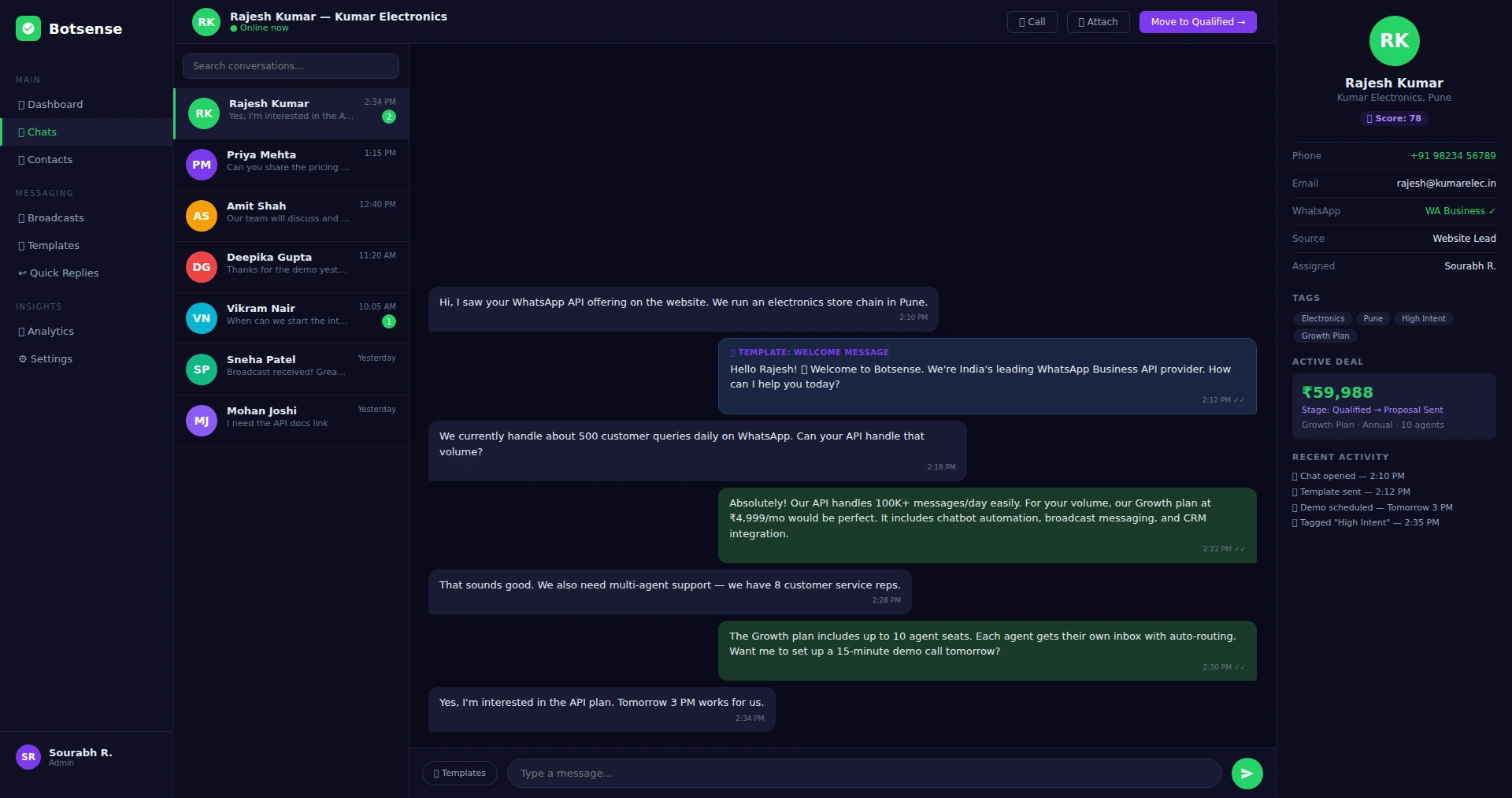
Crm Whatsapp Integration: Why WhatsApp-First CRM Matters for Indian Sales
The average Indian professional checks WhatsApp 30+ times per day. Email open rates for B2C in India hover around 12-18%. WhatsApp message open rates are above 90%. The math is obvious — and yet most CRMs still treat WhatsApp as an afterthought, offering a third-party Zapier integration that breaks every update, charges extra per message, and requires a developer to configure. This is a key consideration when evaluating crm whatsapp integration for your business.
LeadSense chose a different approach. Instead of adding WhatsApp as a feature, we treated it as a core communication layer from day one. Every contact record, every deal card, every pipeline view has WhatsApp built in. Conversations are captured automatically. Replies are logged to the timeline. Message read receipts feed into the AI lead score. Silence triggers automated follow-up sequences. And the whole thing uses the official Meta WhatsApp Business API — so your account is compliant, safe, and can send up to 250,000 messages per day as your business scales. This is a key consideration when evaluating crm whatsapp integration for your business.
For deeper WhatsApp capabilities — broadcast campaigns, chatbot automation, multi-agent inbox — explore our dedicated WhatsApp CRM and WhatsApp Chatbot products that extend LeadSense's core CRM integration. This is a key consideration when evaluating crm whatsapp integration for your business.
Crm Whatsapp Integration: What You Can Do with WhatsApp Inside LeadSense
Send and Receive from the Deal Record
Open any contact or deal in LeadSense. The right panel shows the full WhatsApp conversation thread. Reply directly from there — no app switching, no copy-pasting the number into WhatsApp Web. This is a key consideration when evaluating crm whatsapp integration for your business.
Shared Team Inbox
Multiple agents handle WhatsApp from one business number. Conversations are assigned to specific reps. Supervisors see all active conversations. Transfer conversations between agents in one click. This is a key consideration when evaluating crm whatsapp integration for your business.
Approved Template Sending
Send Meta-approved message templates for payment reminders, appointment confirmations, proposal alerts, and follow-up nudges. Templates are stored in the LeadSense library — pick one and send in two clicks. This is a key consideration when evaluating crm whatsapp integration for your business.
Automated WhatsApp Sequences
Build multi-step WhatsApp follow-up sequences: Day 0 welcome, Day 2 value message, Day 5 case study, Day 10 urgency nudge. If a contact replies at any step, the sequence pauses automatically and the conversation routes to a human rep.
Stage-Triggered Messages
When a deal moves to Proposal Sent, automatically send the proposal PDF link via WhatsApp. When a deal moves to Closed Won, send a congratulatory onboarding message. Automate the communication that happens at every pipeline milestone.
WhatsApp Signals in AI Scoring
Every WhatsApp event — message sent, delivered, read, replied — feeds into the AI lead score in real time. A lead who reads your message and replies within 5 minutes gets a significant score boost automatically.
Setting Up WhatsApp in LeadSense — Steps
Connect Your Business Number
In LeadSense Settings, go to WhatsApp Integration and click Connect. You will be guided through the Meta Business Manager verification flow. This takes 15-30 minutes for a pre-verified business, or up to 24 hours for a new Meta Business account.
Set Up Inbox Routing
Define which team members or queues receive inbound conversations, and configure assignment rules based on contact owner, tags, or message keywords. Inbound messages from unknown numbers create a new contact automatically.
Import or Create Message Templates
Upload your existing Meta-approved templates or create new ones from the LeadSense template library. Templates are categorised by use case — follow-up, payment, onboarding, re-engagement — for fast access during conversations.
Build Your First Automation
Use the drag-and-drop automation builder to create your first WhatsApp sequence. A simple welcome sequence (send on lead creation, wait 2 days, send follow-up, wait 3 days, send case study) takes about 10 minutes to configure.
Related WhatsApp Products from Botsense
LeadSense's WhatsApp CRM integration is focused on sales pipeline use cases. If you need broader WhatsApp capabilities, Botsense offers dedicated products that work alongside LeadSense:
WhatsApp Business API
Full WhatsApp Business API onboarding, number verification, and broadcast infrastructure for marketing campaigns at scale.
WhatsApp CRM
A purpose-built WhatsApp team inbox and CRM for customer support and service teams managing high conversation volumes.
WhatsApp Chatbot
AI-powered chatbot flows for WhatsApp — qualify leads, answer FAQs, book appointments, and route conversations automatically before a human rep takes over.
How WhatsApp Integration Works Inside LeadSense
Unlike CRMs that bolt on WhatsApp through third-party connectors, LeadSense has the WhatsApp Business API built into its core architecture. Every feature — from lead cards to pipeline stages to team collaboration — is designed around WhatsApp as the primary communication channel. Here is exactly how it works:
Connect Your WhatsApp Business Number
During onboarding, LeadSense connects your official Meta-approved WhatsApp Business number to the platform. This is the same number your customers already know. The setup takes 24-48 hours and includes Meta Business verification, template message approval, and webhook configuration. Once connected, every WhatsApp message — inbound and outbound — flows through LeadSense. Your team stops using personal WhatsApp for business conversations forever.
WhatsApp Conversations in Lead Timeline
Open any lead card and you see the complete WhatsApp conversation history alongside notes, call logs, emails, and stage changes. No more switching between WhatsApp Web and your CRM to piece together what happened with a lead. When a prospect sends a message at 11 PM, it appears in their lead timeline the next morning with full context. Multiple team members can see the same conversation — if a salesperson is on leave, their colleague picks up smoothly.
Template Messages from Pipeline Cards
Meta requires all outbound WhatsApp messages to be pre-approved templates (outside the 24-hour reply window). LeadSense manages your entire template library. From any deal card, click "Send Template," pick the right message (welcome, pricing, brochure, appointment confirmation), and it goes out instantly. Variables like customer name, deal value, and meeting time are auto-filled from the lead record. Your team sends professional, compliant messages without memorising template formats.
Broadcasts and Drip Campaigns
Need to reach 5,000 contacts with a Diwali offer? LeadSense's broadcast feature sends template messages in bulk with delivery tracking. For longer nurturing sequences, set up drip campaigns: a welcome message on day 1, product catalogue on day 3, testimonial on day 5, and a limited-time discount on day 7. Each message triggers only if the previous one was delivered. Open rates of 92-98% mean your messages actually get read — compared to 15-20% for email drips.
WhatsApp CRM Use Cases Across Indian Industries
D2C Brands: Cart Recovery on WhatsApp
Abandoned cart recovery via email yields 5-8% conversion in India. Via WhatsApp, it hits 15-22%. LeadSense integrates with Shopify to detect abandoned carts and automatically triggers a WhatsApp recovery message within 30 minutes. The message includes the product image, price, and a direct checkout link. If the customer does not respond within 24 hours, a follow-up with a 10% discount code goes out. A D2C brand selling premium tea in Delhi recovered ₹2.3 lakh in abandoned carts in their first month using this workflow — paying for their entire annual LeadSense subscription in one campaign.
Real Estate: Virtual Tour Sharing and Site Visit Scheduling
Property developers share project videos, floor plans, and 360-degree virtual tours through WhatsApp. LeadSense tracks which prospects opened the media, how many times, and whether they responded. Interested prospects are automatically offered available site visit slots via a WhatsApp interactive list message. The booking confirmation, directions, and parking details are sent as a follow-up template. This automated workflow replaces the manual back-and-forth that typically takes 8-10 messages per prospect.
Healthcare: Appointment Reminders and Lab Reports
Clinics use LeadSense to send appointment reminders 24 hours before the visit, followed by a check-in link on the day. Post-consultation, lab report PDFs are delivered via WhatsApp with the doctor's summary. Follow-up appointment suggestions go out based on the treatment plan timeline. A multi-branch dental clinic in Hyderabad reduced no-show rates from 22% to 7% using WhatsApp reminders through LeadSense, directly improving their revenue per chair per day.
Financial Services: Policy Updates and Premium Reminders
Insurance agents and mutual fund distributors use LeadSense to send policy renewal reminders, SIP payment confirmations, and new product announcements via WhatsApp. Each message is personalised with the client's policy number, premium amount, and due date. The automation engine triggers reminders at 30 days, 15 days, and 3 days before expiry, ensuring no renewal is missed. Agents report 35% improvement in on-time renewal rates.
Why Native WhatsApp Beats Third-Party Integrations
Many CRMs claim "WhatsApp integration" but deliver a fundamentally inferior experience. Here is the difference between LeadSense's native approach and bolt-on integrations used by Zoho, HubSpot, and Salesforce:
- No additional cost: Third-party WhatsApp integrations like Twilio, Gupshup, or Interakt charge ₹5,000-₹15,000/month on top of your CRM subscription. LeadSense includes WhatsApp at no extra cost on the Growth plan.
- No data sync delays: Bolt-on integrations sync messages every 5-15 minutes via webhooks. LeadSense shows messages in real time because WhatsApp is the core data layer, not an external addon.
- No context switching: With third-party tools, your team opens the CRM for lead data and a separate WhatsApp dashboard for messaging. LeadSense puts both in the same screen — the conversation and the deal card side by side.
- Templates managed in one place: External WhatsApp providers have their own template management portal. LeadSense manages templates within the CRM, auto-fills lead data into template variables, and tracks delivery metrics alongside deal progression.
- Unified analytics: When WhatsApp is an add-on, campaign analytics live in a separate dashboard. LeadSense correlates WhatsApp engagement (opens, replies, link clicks) with pipeline movement in a single report. You can answer "Which WhatsApp template moved the most deals to Qualified?" in one click.
For Indian businesses where 80% of customer communication happens on WhatsApp, the difference between native and bolt-on integration is the difference between a CRM your team actually uses and a CRM they work around.
WhatsApp Integration FAQ
Stop Managing WhatsApp Outside Your CRM
Connect your WhatsApp Business number to LeadSense today. Most teams are up and running within the hour.